 简体中文
简体中文 English (US)
 Bahasa Melayu
 العربية
 Français
 Русский
 Español
 Tiếng Việt
 繁體中文
繁體中文
简体中文English (US)Bahasa MelayuالعربيةFrançaisРусскийEspañolTiếng Việt繁體中文
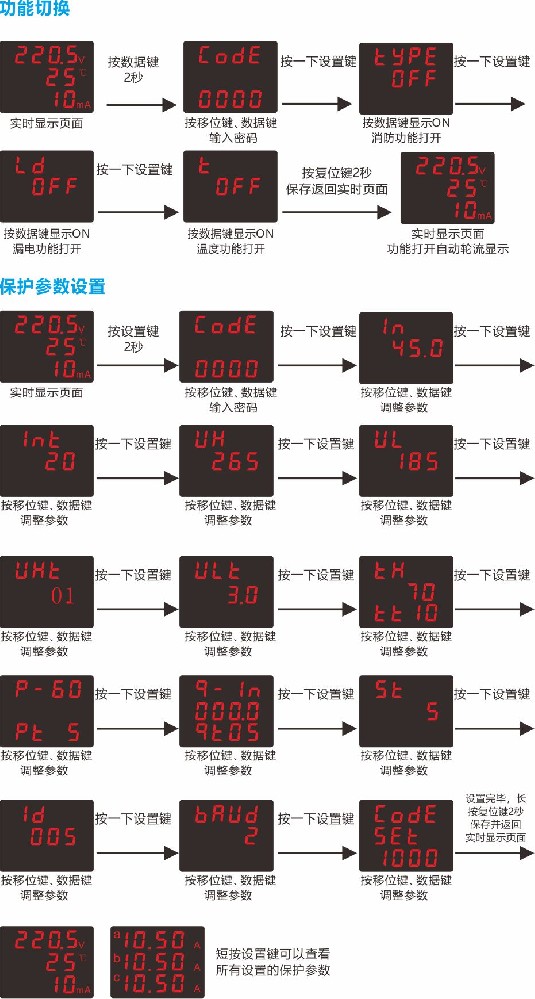
Key Points: How to Set Up the Three-Display Control and Protection Switch (Setting Method for CPS Control and Protection Switch) Function Parameter Settings 1. Press the data key for 2 seconds to enter the menu settings. Use the data key and shift key to enter the password, then press the set key once to confirm the password. 2. Enter the parameter settings and use the data key and shift key to set the parameters. 3. Press the set key to proceed to the next parameter setting. 4. After all parameters have been set, press the reset key for 2 seconds to save and exit, returning to the real-time display. Protection Parameter Settings 1. Press the set key
Control and Protection Switch Extended Function Parameter Settings
1. Press the data key for 2 seconds to enter the password page. Use the data key and shift key to enter the password, then press the set key once to confirm the password
2. Enter parameter setting, use the data key and shift key to set parameters,
3. Press the set key to move to the next parameter setting
4. After all parameters are set, press the reset key for 2 seconds to save and exit, and return to the real-time display
Control and Protection Switch Protection Parameter Settings
1. Press the set key for 2 seconds to enter the password page. Use the data key and shift key to enter the password, then press the set key once to confirm the password
2. Enter parameter setting, use the data key and shift key to set parameters,
3. Press the set key to move to the next parameter setting
4. After all parameters are set, press the reset key for 2 seconds to save and exit, and return to the real-time display
Copyright © 2018-2020 Wenzhou Jiangguang Electrical Technology Co., Ltd. All Rights Reserved. Zhejiang Icp Record No. 15019439-3